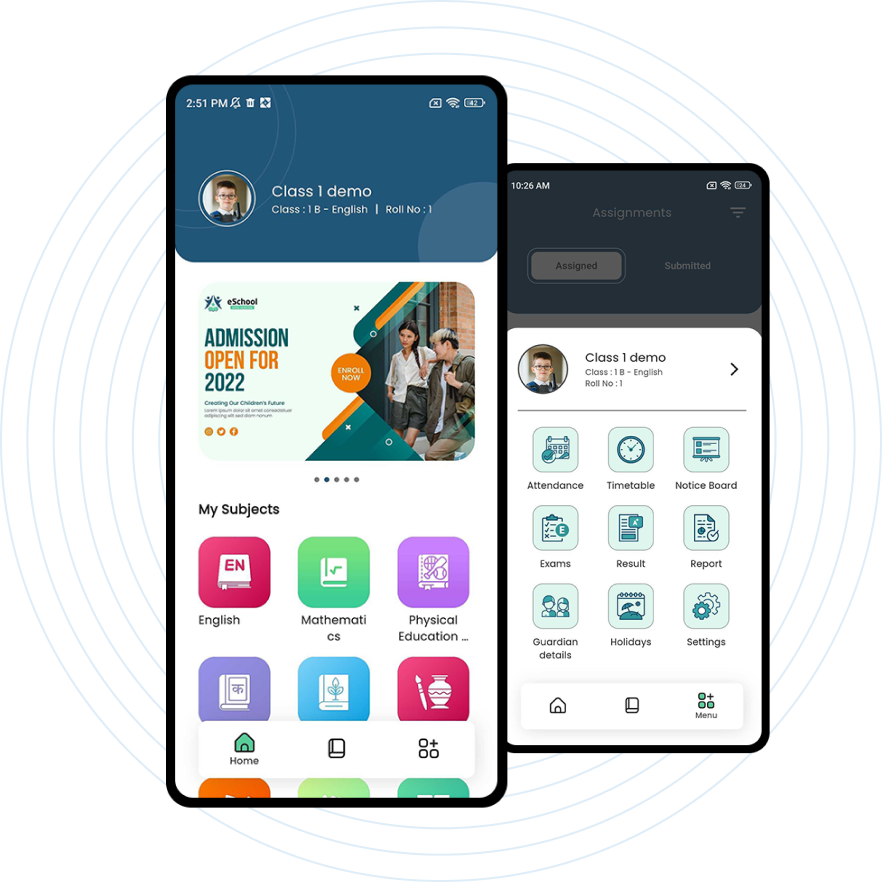
Eduako - School Management System Transform School Management With EDUAKO Experience the future of education with our Eduako platform. Streamline attendance, assignments, exams, and more. Elevate your school's efficiency and engagement.

Demo School
Top Rated Instructors
Opt for Eduako 14+ robust features for an enhanced educational experience.
Explore Our Top Features
Student Management
Academics Management
Slider Management
Teacher Management
Session Year Management
Holiday Management
Timetable Management
Attendance Management
Exam Management
Schools

A modern and unique style

Why it is best?

Eduako is the pinnacle of school management, offering advanced technology, user-friendly features, and personalized solutions. It simplifies communication, streamlines administrative tasks, and elevates the educational experience for all stakeholders. With Eduako, excellence in education management is guaranteed.

Affordable price Easy to manage admin panel Data Security
Flexible Pricing Packages
No packages available.

Custom Package

Tailor your experience with our custom package options. From personalized services to bespoke solutions, we offer flexibility to meet your unique needs.

Frequently Asked Questions

A: Your school administrator will provide you with a username (often your school email or ID) and a temporary password. Visit www.eduako.com and click "Login." Enter your credentials and you will be prompted to create a new, strong password immediately.

A: On the login page, click the "Forgot Password?" link. Enter the email address registered with your account. You will receive an email with a secure link to reset your password. Common Mistake: Ensure you are checking the correct email inbox, including the spam/junk folder.

A: Eduako uses role-based permissions. Your access is determined by your role (e.g., Teacher, Parent, Accountant, Administrator). If you lack access to a necessary module, please contact your school's system administrator to review and adjust your permissions.

A: Navigate to the Attendance Management module. Select your class, the date, and you will see a list of students. Simply click the dropdown or button next to each student's name to mark them as "Present," "Absent," or "Late." Remember to click "Save" or "Submit" at the bottom of the page.

A: Go to the Exam Management or Assignment Management module. Select the relevant exam/assignment, then your class. You can enter grades directly into the spreadsheet-like interface. You can also add comments. Once complete, save the changes. Use the "Publish" function to release grades to students and parents.

A: Use the Announcement Management or Chat Module. Create a new announcement, select the target audience (e.g., "Class 5B Parents"), write your message, and post it. Parents will receive a notification via the app or portal.

A: In the Exam Management or Report section, find the "Generate Report Cards" option. Select the academic term, class, and examination. The system will compile all grades and comments. You can then preview, print, or make them available for download via the parent portal.

A: Yes. Most list views and reports in Eduako (e.g., Student Lists, Grade Sheets, Fee Statements) have an "Export" button (usually as an Excel or CSV icon). Click it to download the data for offline use or further analysis.

A: Go to Student Management and use the search bar at the top. You can search by name, student ID, or class. Clicking on the student's name will open their detailed profile, showing academic history, attendance, fees, and more.

A: Eduako is a web-based system. You need:

A stable internet connection.

An up-to-date web browser (Google Chrome, Mozilla Firefox, Microsoft Edge, or Safari are recommended).

For the best experience, avoid using outdated browsers like Internet Explorer.

A: Follow these steps:

Refresh your browser.

Check your internet connection.

Clear your browser's cache and cookies. (This solves many display issues).

Try using a different browser to see if the problem is specific to one.

If the issue persists, note the exact error message and contact your school's IT support or Eduako admin.

A: Yes! Eduako has a mobile app for on-the-go access. Look for "Eduako" on the Google Play Store (Android) or Apple App Store (iOS). Download the app and log in with the same credentials you use for the website.

A: Absolutely. Eduako employs industry-standard security measures including data encryption (in transit and at rest), secure servers, and strict access controls. We are designed to comply with major data protection regulations. Your school's administrator controls who can see specific types of information.

A: No. Parent and student accounts are private. A parent can only view information related to their own child(ren). The system's permissions are designed to ensure strict data confidentiality between families.

A: Administrators should go to Session Year Management. You can close the current session and initiate a new one. This process typically involves setting start/end dates, promoting students to the next grade level, and clearing transient data. Important: We recommend backing up data and performing this action during a low-activity period.

A: Administrators can add individuals one at a time via Student Management or Staff Management by clicking "Add New." For bulk additions, use the "Import" function with a pre-formatted CSV/Excel file. Common Mistake: Ensure the column headers in your import file exactly match the system's required format to avoid errors.

A: In the Fees Management module, administrators can create different fee types (e.g., Tuition, Sports). You can then assign these fees to specific classes or student groups, setting amounts, due dates, and late fine rules

A: Please follow this support path for the fastest resolution:

First, contact your school's designated Eduako administrator or IT coordinator. They can solve most permission and school-specific issues.

If the issue is technical and related to the Eduako platform itself, your administrator can contact Eduako official support via:

Phone: 254 108 347 399

Location: Kitengela along Namanga Road, Kenya (for official correspondence).
Let's Get In Touch Have a question or just want to say hi? We'd love to hear from you.
Phone Mobile : 254108347399
Email hello@eduako.com
Location Located in Kitengela along Namanga Road Kenya
Download Our App Now! Join the ranks of true trivia champions and quench your thirst for knowledge with Masters of Trivia - the ultimate quiz app designed to test your wits and unlock a world of fun facts. Challenge your brain, compete with friends, and discover fascinating tidbits from diverse categories. Don't miss out on the exhilarating experience that awaits you - get started now!Join the ranks of true trivia champions and quench your thirst for knowledge with Masters of Trivia - the ultimate quiz app designed to test your wits and unlock a world of fun facts.